
Our Top Picks at a Glance
If you buy just one, start with our Best Overall pick.

Retro Beige 75% Wireless Mechanical
This beige 75% keyboard pairs a retro-inspired palette with a compact layout that retains useful keys for everyday work. Wireless modes and hot-swappable linear switches make it an appealing option for a writer or gamer who likes a customizable setup.
$41.89
Buy on Amazon
7KEYS Retro Typewriter Mechanical Keyboard
The typewriter-inspired design makes this a standout gift for someone who loves vintage desk accessories. Its Bluetooth, wired, and 2.4 GHz options provide connection flexibility for compatible computers and other devices.
$127.99
Buy on Amazon
Newmen GM610 60% Wireless Keyboard
This compact mechanical gaming board is a space-saving gift for someone who wants to clear room for a mouse or notebook. Its 60% format and linear red switches suit a minimalist setup, though the recipient should be comfortable using key combinations for missing functions.
$25.99
Buy on AmazonA keyboard can be more than a computer accessory: it can make a writing desk feel inviting or give a gaming setup a distinctive vintage touch. Compact retro keyboards combine nostalgic styling—think warm colors, rounded keycaps, and classic typewriter details—with space-conscious layouts suited to modern desks. They make memorable gifts for writers who want a more characterful workspace and gamers who appreciate mechanical feel, colorful lighting, or extra room for mouse movement.
Why These Gifts Work
Unlike a purely decorative present, a keyboard can become part of someone’s daily routine. A smaller 60% or 75% layout frees up desk space, while retro-inspired finishes bring personality to a home office or gaming corner. Mechanical models offer a more tactile typing experience, and wireless options can help keep a multi-device desk tidy. For a broader nostalgia-focused shortlist, explore 21 Creative Gifts for Retro Gamers. If the recipient spends more time drafting stories than gaming, 21 Creative Gifts for Fiction Writers Who Love to Pen Stories offers additional inspiration.
How to Choose
Budget-friendly gifts
Entry-level compact wired keyboards and simple wireless combos are good picks when you want a fun visual upgrade without stretching your budget. Check whether the layout includes the keys the recipient uses most, such as dedicated arrows or a number pad.
Mid-range upgrades
In the mid-range, look for mechanical switches, adjustable RGB lighting, wireless connectivity, and a 65% or 75% layout. These options often balance desk space with practical navigation keys, making them versatile for both writing and gaming.
Premium-feeling picks
For a more substantial gift, consider a model with hot-swappable switches, durable keycaps, multiple connection modes, or a programmable knob. These features can suit enthusiasts who enjoy customizing their setup, though compatibility and layout should be checked before buying.
Things to Consider
- Layout: Compact boards may omit the function row, number pad, or dedicated arrow keys.
- Switch feel: Linear, tactile, and clicky switches sound and feel different; consider shared rooms and personal preference.
- Connection: Confirm whether the keyboard is wired, Bluetooth, or uses a 2.4 GHz receiver.
- Operating system: Verify Mac and Windows support, key legends, and any included software.
- Retro style: Round typewriter-style keys look distinctive, but the recipient may prefer conventional key shapes for long sessions.
1. Retro Beige 75% Wireless Mechanical
This beige 75% keyboard pairs a retro-inspired palette with a compact layout that retains useful keys for everyday work. Wireless modes and hot-swappable linear switches make it an appealing option for a writer or gamer who likes a customizable setup.
Pros
- ✓75% layout balances compact size with navigation keys
- ✓Bluetooth, 2.4 GHz, and USB-C connectivity
- ✓Hot-swappable switches support future customization
Cons
- ✗Linear switches may not suit someone who prefers a tactile bump
- ✗Confirm the exact layout and device compatibility before gifting
2. 7KEYS Retro Typewriter Mechanical Keyboard
The typewriter-inspired design makes this a standout gift for someone who loves vintage desk accessories. Its Bluetooth, wired, and 2.4 GHz options provide connection flexibility for compatible computers and other devices.
Pros
- ✓Distinctive vintage typewriter styling
- ✓Offers Bluetooth, wired, and 2.4 GHz connections
- ✓RGB backlighting adds a gaming-friendly touch
Cons
- ✗Typewriter styling may take adjustment for fast everyday typing
- ✗Check the board’s size and key layout before ordering
3. Newmen GM610 60% Wireless Keyboard
This compact mechanical gaming board is a space-saving gift for someone who wants to clear room for a mouse or notebook. Its 60% format and linear red switches suit a minimalist setup, though the recipient should be comfortable using key combinations for missing functions.
Pros
- ✓Very compact 60% layout saves desk space
- ✓Linear red switches are designed for smooth keypresses
- ✓Wireless design avoids a permanent keyboard cable
Cons
- ✗Dedicated arrow and function keys are omitted
- ✗Check connection and layout requirements for the recipient’s devices

4. XVX Retro 75% Gaming Keyboard
A 75% layout gives this wired keyboard a compact footprint without trimming away as many everyday keys as a 60% board. Its retro gaming design and customizable switches make it a practical gift for someone who likes a distinctive desk aesthetic.
Pros
- ✓75% format keeps a compact footprint
- ✓Includes two USB hub ports according to the listing
- ✓Customizable switches appeal to keyboard enthusiasts
Cons
- ✗Wired connection is less flexible than a wireless board
- ✗Verify hub and switch features in the current listing

5. Creamy Retro 75% Mechanical Keyboard
This compact wired board combines a retro look with a knob and hot-swappable design, giving a recipient both style and room to customize. Its 75% layout is a useful compromise for mixed writing and gaming use.
Pros
- ✓Compact 75% arrangement retains useful navigation keys
- ✓Hot-swappable design allows switch changes
- ✓Multifunction knob adds convenient controls
Cons
- ✗Wired-only use may not suit a cable-free desk
- ✗Confirm keycap and switch details for the selected version

6. MageGee MK-Box Compact Gaming Keyboard
The compact 68-key design offers a smaller desk footprint while retaining a more practical key count than many 60% boards. It is a straightforward wired gift for a gamer or student who values function over wireless convenience.
Pros
- ✓68-key compact arrangement
- ✓Wired USB connection avoids battery charging
- ✓LED backlighting helps give the desk a gaming feel
Cons
- ✗Wired cable limits placement flexibility
- ✗The listing’s conventional styling is less overtly vintage

7. MOFII Retro Keyboard and Mouse Combo
This colorful typewriter-style keyboard and mouse set offers a coordinated retro look as a ready-made desk gift. Its full-size layout includes a number pad, making it more suitable for writers or home-office users who prefer familiar keys over a minimal gaming layout.
Pros
- ✓Keyboard and mouse arrive as a coordinated set
- ✓Full-size layout includes a number pad
- ✓2.4 GHz wireless connection reduces desk cable clutter
Cons
- ✗Full-size footprint is not truly compact
- ✗Combo styling and key feel may not match mechanical keyboard preferences

8. Mini Bluetooth Retro Typewriter Keyboard
This mini Bluetooth board offers an especially distinctive typewriter-inspired look in a smaller package. It can be a fun gift for a writer who wants a portable keyboard, provided the recipient is comfortable with its 85-key arrangement and Bluetooth setup.
Pros
- ✓Mini format is easier to fit on a small desk
- ✓Bluetooth connectivity supports compatible devices
- ✓Retro typewriter appearance makes a memorable present
Cons
- ✗Check the 85-key layout for missing or combined functions
- ✗The listing does not establish mechanical switch construction

9. Steampunk Typewriter Pudding Keycaps
For someone who already owns a mechanical keyboard, a themed keycap set can deliver retro personality without replacing their whole setup. The black steampunk-inspired design and backlight-friendly style make this a smaller accessory gift for a customization fan.
Pros
- ✓Adds a typewriter-inspired aesthetic to an existing keyboard
- ✓Pudding-style caps are designed to complement backlighting
- ✓Includes a keycap puller according to the listing
Cons
- ✗Compatibility depends on the keyboard’s layout and switch stems
- ✗Keycaps are an accessory, not a complete keyboard

10. Compact Retro Wireless Keyboard Combo
This round-key wireless keyboard and mouse combo offers a vintage look for a simple home or study setup. It is a practical gift when appearance and a matching mouse matter more than the switch customization found on mechanical boards.
Pros
- ✓Includes a matching wireless mouse
- ✓Round keycaps provide a clear retro visual theme
- ✓Compact wireless setup can reduce cable clutter
Cons
- ✗Check actual dimensions because the listing does not specify a percentage layout
- ✗Not presented as a mechanical keyboard

11. Aurora Red Retro Wireless Combo
The red round-key design brings color and a typewriter-inspired touch to a desk, while the included mouse makes this a complete starter gift. It is better suited to general typing and home use than to someone specifically seeking a compact mechanical gaming board.
Pros
- ✓Distinctive Aurora Red color option
- ✓Keyboard and mouse are bundled together
- ✓Wireless set is convenient for a tidy desk
Cons
- ✗Full-size styling may take up more desk space
- ✗The listing does not describe mechanical switches
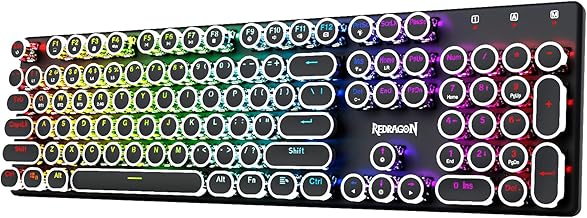
12. Redragon Wireless Typewriter Keyboard
This wireless typewriter-style mechanical gaming keyboard is a striking gift for someone who wants vintage looks without giving up a gaming-oriented identity. Its black finish is less colorful than some retro designs, so it may suit recipients who prefer a darker desk setup.
Pros
- ✓Mechanical gaming positioning with typewriter-inspired styling
- ✓Wireless format helps reduce cable clutter
- ✓Black finish fits understated setups
Cons
- ✗Check layout dimensions and connection details on the listing
- ✗Round vintage-style keys may not suit every fast typist
Buying a Compact Retro Keyboard as a Gift
Start with how the recipient uses their desk. Writers may value comfortable key spacing, a familiar layout, and a switch sound that will not distract during long sessions. Gamers often prioritize reliable input, anti-ghosting, lighting controls, and enough desk space to move a mouse. A 75% keyboard keeps a function row and arrow keys while staying compact; a 60% board saves more room but relies on key combinations for functions and navigation.
As a general shopping guide, basic compact keyboards and simple wireless combos often sit in the budget range, while mechanical models with RGB or multi-device connectivity tend to cost more. Hot-swappable switches, premium materials, and customization features can raise the price further. Compare current Amazon listings, product dimensions, connection details, return terms, and recent buyer feedback rather than relying on styling alone.
- Check compatibility: Confirm the recipient’s computer or tablet supports the connection type and operating system.
- Choose a layout carefully: Ask whether they need a number pad, function row, dedicated arrows, or a particular key arrangement.
- Think about noise: Clicky switches can be satisfying but may not suit shared offices or quiet rooms.
- Make it gift-ready: Pair the keyboard with a desk mat, keycap puller, or a small note explaining why its retro look reminded you of them.
When uncertain, a hot-swappable or multi-connection keyboard can offer flexibility, but verify exactly which switches and devices it supports before purchase.
Frequently Asked Questions
What compact retro keyboard layout is best for writers?
A 75% layout is often a useful middle ground for writers because it saves desk space while retaining the function row and dedicated arrow keys. Check whether the recipient needs a number pad or prefers a full-size board.
Are 60% retro mechanical keyboards good for gaming?
They can work well for many games and leave more room for mouse movement, but a 60% layout usually omits dedicated arrow and function keys. Confirm the games and shortcuts the recipient uses before choosing one.
Which switches should I choose for a keyboard gift?
Linear switches have a smooth keypress, tactile switches provide a noticeable bump, and clicky switches add audible feedback. If you do not know the recipient’s preference, choose a quieter option or a model with replaceable switches.
Are typewriter-style keyboards comfortable for long writing sessions?
Comfort depends on the key spacing, profile, and the user’s typing habits. Rounded retro keycaps make a strong visual statement, but they may feel unfamiliar, so check the layout and return policy when buying.
What should I check before buying a wireless retro keyboard?
Verify whether it uses Bluetooth, a 2.4 GHz USB receiver, or both, and check battery or charging requirements. Also confirm operating-system compatibility and whether the compact layout includes the keys the recipient needs.


