
Our Top Picks at a Glance
If you buy just one, start with our Best Overall pick.

AULA Typewriter Style Keyboard
This wired 104-key keyboard brings typewriter-inspired styling to a familiar full-size layout. It is a practical retro gift for someone who wants a nostalgic look without giving up a dedicated number pad.
$48.99
Buy on Amazon
Compact Bluetooth Typewriter Keyboard
The 83-key layout offers a vintage typewriter appearance in a smaller footprint, and Bluetooth connectivity makes it easier to pair with compatible devices. Its compact size makes it a thoughtful option for a limited desk or mobile workspace.
$83.99
Buy on Amazon
Royal Kludge S108 Retro Keyboard
This full-size board combines round keycaps with RGB side lighting and a detachable wrist rest. It suits a recipient who likes vintage styling but also wants a more colorful gaming-desk presentation.
$66.99
Buy on AmazonA retro mechanical keyboard can make everyday typing feel like a small celebration of vintage design. With rounded typewriter-inspired keycaps, warm cream and wood tones, and the satisfying character of mechanical switches, it can turn a practical computer accessory into a standout gift. Whether you are shopping for a writer, a gamer, or someone who loves nostalgic desk setups, the best choice balances appearance with the way the recipient actually works.
Why These Gifts Work
Mechanical keyboards are used for hours at a time, so a gift can be both personal and genuinely useful. Retro styling gives the desk a distinctive look, while features such as a full-size layout, wireless connectivity, programmable keys, and customizable keycaps let shoppers match the keyboard to different routines. A complete keyboard is a straightforward present; a keycap set is a more personal add-on for someone who already owns a compatible mechanical board.
Think about the whole setup, too. A desk mat or wrist rest can complement a vintage-inspired keyboard, while a wireless model may suit a tidy shared workspace better than a cable-heavy gaming station. For more nostalgia-led inspiration, browse 21 Creative Gifts for Retro Gamers or explore 10 Retro Gifts for Him That Bring Back Nostalgia.
How to Choose
Budget
At the budget end, look for a wired typewriter-style keyboard or a retro keycap set. These options can deliver the visual theme without requiring a premium spend. Before buying keycaps, check the recipient's keyboard layout, switch compatibility, and whether the set includes the right modifiers.
Mid-range
Mid-range keyboards often add a more distinctive finish, a detachable wrist rest, lighting, or wireless connection. Choose the connection type and layout based on the person's devices and desk space rather than appearance alone.
Premium
Premium picks may offer multi-device connectivity, hot-swappable switches, or customization features. They make sense for enthusiasts who enjoy tuning their setup, but can be unnecessary for someone who simply wants a comfortable everyday keyboard.
Things to Consider
- Switch sound: Clicky switches can be charming but disruptive in quiet rooms or shared offices.
- Layout and size: Full-size boards include a number pad; compact layouts save desk space.
- Compatibility: Confirm Windows, Mac, tablet, or phone support and the connection method.
- Typing feel: Round keycaps look nostalgic, but their shape may feel unfamiliar at first.
- Gift presentation: A matching desk accessory can make a keyboard gift feel like a complete setup.
1. AULA Typewriter Style Keyboard
This wired 104-key keyboard brings typewriter-inspired styling to a familiar full-size layout. It is a practical retro gift for someone who wants a nostalgic look without giving up a dedicated number pad.
Pros
- ✓Full-size 104-key layout
- ✓Distinctive typewriter-inspired design
- ✓Wired connection avoids battery charging
Cons
- ✗Cable limits placement flexibility
- ✗Clicky typing may be loud in shared spaces
2. Compact Bluetooth Typewriter Keyboard
The 83-key layout offers a vintage typewriter appearance in a smaller footprint, and Bluetooth connectivity makes it easier to pair with compatible devices. Its compact size makes it a thoughtful option for a limited desk or mobile workspace.
Pros
- ✓Compact 83-key layout
- ✓Bluetooth 5.0 connectivity
- ✓White LED backlighting
Cons
- ✗No dedicated number pad
- ✗Blue-style switches may be noisy
3. Royal Kludge S108 Retro Keyboard
This full-size board combines round keycaps with RGB side lighting and a detachable wrist rest. It suits a recipient who likes vintage styling but also wants a more colorful gaming-desk presentation.
Pros
- ✓Full 108-key layout
- ✓RGB side lighting
- ✓Detachable wrist rest included
Cons
- ✗Wired design is less flexible
- ✗Blue switches can be loud

4. Soft Clack Green Retro Keyboard
This wired typewriter-style option adds a media knob and a green color theme for a distinctive desk accent. It can be a nice match for someone who values quick media controls along with vintage-inspired design.
Pros
- ✓Convenient media control knob
- ✓Retro typewriter-style appearance
- ✓Affordable wired option
Cons
- ✗Wired-only connectivity
- ✗Listing details should be checked for layout and switch preferences

5. Steampunk Round Keycap Set
A round, backlit-friendly keycap set is a relatively affordable way to give a compatible mechanical keyboard a vintage or steampunk makeover. It is a more personal gift for someone who already enjoys customizing their desk.
Pros
- ✓Distinctive round keycap styling
- ✓Includes 104 keys
- ✓Keycap puller included
Cons
- ✗Compatibility depends on the keyboard layout
- ✗Keycaps do not include a keyboard

6. Retro 9009 Beige Keycaps
The beige-and-gray color scheme with pink accents gives a compatible keyboard a subtle vintage refresh. Its 148-key count offers more layout options than a basic set, though shoppers should still verify their board's exact configuration.
Pros
- ✓148-key set supports multiple layouts
- ✓PBT material with dye-sublimated legends
- ✓Understated retro color palette
Cons
- ✗Requires a compatible mechanical keyboard
- ✗Does not include switches or the keyboard itself

7. Tiramisu Cream Brown Keycaps
Cream and brown colors give this PBT keycap set a warm, nostalgic feel that pairs naturally with vintage-inspired desks. It is a compact gift idea for someone who likes to personalize a mechanical keyboard without replacing the whole board.
Pros
- ✓Warm cream-and-brown colorway
- ✓PBT keycap material
- ✓Distinctive MA profile
Cons
- ✗Profile may feel different from standard keycaps
- ✗Keyboard compatibility needs checking

8. Wood-Grain Typewriter Keyboard
A wood-grain finish and round typewriter-style keys make this full-size wired model a desk centerpiece as well as a typing tool. Its linear switches may appeal to someone who likes a retro look but wants a smoother press than a clicky switch.
Pros
- ✓Wood-grain vintage-inspired finish
- ✓Full-size 104-key layout
- ✓Green linear switches
Cons
- ✗Wired connection only
- ✗Wood-grain appearance may not suit every setup

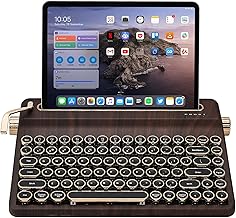
9. Programmable Wood-Grain Keyboard
This retro-styled wired keyboard pairs a wood-grain appearance with QMK/VIA programmability, giving customization-minded recipients more ways to tailor their setup. It is a strong choice when the gift recipient enjoys both nostalgic design and keyboard tinkering.
Pros
- ✓QMK/VIA programmable features
- ✓Full-size 104-key layout
- ✓Green linear switches
Cons
- ✗Wired-only connection
- ✗Advanced customization may be unnecessary for casual users
10. YUNZII QL75 Retro Keyboard
This compact retro keyboard combines a wood-inspired design with RGB lighting and hot-swap capability. The smaller layout can free desk space, while switch swapping gives enthusiasts room to personalize the typing feel.
Pros
- ✓Hot-swappable switch design
- ✓RGB backlighting
- ✓Compact 75% layout
Cons
- ✗Smaller layout lacks a full number pad
- ✗Price may exceed a basic wired keyboard

11. FINEDAY Wireless Retro Keyboard
This premium full-size keyboard offers Bluetooth and 2.4 GHz wireless connections, making it useful for recipients who move between compatible devices. Its typewriter-inspired styling and substantial battery capacity make it a more feature-rich gift than a basic wired board.
Pros
- ✓Bluetooth and 2.4 GHz wireless options
- ✓Full-size 104-key layout
- ✓5000mAh battery capacity listed
Cons
- ✗Premium price compared with simpler models
- ✗Blue switches may be loud for shared workspaces

12. Retro Tape Recorder Desk Mat
A retro tape-recorder-themed desk mat and wrist-rest set adds a nostalgic accent alongside a mechanical keyboard. It is a useful companion gift when the recipient already owns a keyboard or when you want to build a coordinated desk bundle.
Pros
- ✓Retro cassette-inspired artwork
- ✓Includes a keyboard wrist rest and mouse pad
- ✓Large mat can tie together a desk setup
Cons
- ✗Does not include a keyboard
- ✗Large size requires sufficient desk space
Retro Mechanical Keyboard Buying Guide
Start with the recipient's current setup. Check whether they need a full-size number pad, a compact layout, Bluetooth, a USB receiver, or a wired connection. If they switch between a laptop, tablet, and desktop, multi-device wireless support can be especially useful. For a dedicated gaming or office station, a wired board may be simpler and avoid battery charging.
Next, consider the typing experience. Blue or other clicky switches provide audible feedback, while linear switches are generally smoother and quieter. Product listings do not always describe sound consistently, so treat switch type as a clue, not a guarantee. Also check whether the keyboard has a standard layout and whether its keycaps can be replaced.
- Lower price range: Look for wired retro boards and compatible keycap sets; verify layout before purchasing caps.
- Mid-range: Compare wireless options, included wrist rests, lighting, and build details.
- Premium: Prioritize hot-swap support, programmable controls, and multi-device connectivity only if the recipient will use them.
Amazon is a convenient place to compare available models, prices, layouts, and seller details, but check current listing specifications and return policies before ordering. For a gift, include a gift receipt when possible. If you are unsure of the recipient's preferred switch feel or layout, a retro keycap set or desk accessory can be a lower-risk choice—provided it is compatible with their existing keyboard.
Frequently Asked Questions
What is the best retro mechanical keyboard for a typewriter look?
Look for a board with round typewriter-style keycaps, a color palette the recipient likes, and a layout that suits their desk. Wired and wireless models are both available, so compare connection needs as well as appearance.
Are retro mechanical keyboards good for everyday typing?
They can be, especially when the layout and switch feel suit the user. Round keycaps may feel different from standard flat keycaps, and clicky switches can be loud, so consider the recipient's typing habits and work environment.
What retro keyboard gift works for someone who already owns a mechanical keyboard?
A compatible vintage-color keycap set can refresh an existing board without replacing it. Confirm the keyboard's layout, keycap profile, and switch stem compatibility before buying.
Should I buy a wired or wireless retro mechanical keyboard as a gift?
Choose wireless for a cleaner desk or use across multiple devices, after checking Bluetooth or receiver support. Wired models suit fixed desktop setups and do not need battery charging.
Are clicky typewriter-style keyboards too loud for an office?
They may be distracting in shared or quiet offices, particularly if they use clicky switches. For a quieter gift, look for a model with linear switches or confirm that the recipient is comfortable with audible typing.


